 Google Analytics recognises 41 search engines by default. Although this is constantly being added to, there are of course a great many other search engines in the world – language and region specific, as well as price comparison and vertical portals.
This hack is for anyone who manages SEO at a regional level i.e to be able to differentiate regional variations of search engines. For example, the default Search Engine list for Google Analytics shows aggregate search engines – Google, Yahoo, MSN etc., this hack shows regional specific ones for your SEO efforts.
April 2011 – New async hack launched
This hack has been completely revised for the latest GA async code. Further info >>
[ Now 100+ additional SEs + GA defaults (140+ domains). You no longer need to re-define the default set of search engines as this hack now prepends new search engines to GA’s list. For details on new prepend revision see: code.google.com ]
Sample list of regional search engines:
- Google.com
- Google.ca
- Google.com.au
- Google.co.uk
- MSN.co.uk
- MSN.fr
- eniro.se
- eniro.no
- maps.google.com (local search)
- etc.
It is straight forward to add to Google’s list of recognised search engines – you simply add your own as described in the following Help Centre article . However, the Help Centre article cannot customise the list – only add new search engines. That is, “google” as a whole has already been defined so adding google.co.uk to the list won’t work as – it’s too late.
This hack was written to enable you to do this (original 2007 post here ).
Some further background…
I discuss this hack in Chapter 9 of the book and show the script to do this. However recent changes in the Google Analytics Tracking Code (GATC) has meant that the code no longer works written as it was.
Fortunately after some experimenting (a pseudonym for trial and error!), and help from Tomas Remortigue from Mountain View (all round nice guy and Google Analytics technical wiz), the hack is now fixed and back working 🙂
How to track regional search engines
From the book, this is a simple update with respect to the placement of code – the call to the custom_se-ga.js . You can host the script locally (get the file from my scripts directory and place it in /scripts on your web server), or simply link directly to my file as shown.
The JavaScript file first clears the default list of search engines in Google Analytics and then defines 100 regional specific ones. Below is the layout you need to use for GATC:
Schematically, change your standard GATC from:
[js]
[/js]
to:
[js]
[/js]
Notice the line inserted between setting the GA account number and tracking the pageview.
So a full GATC will look as below (remember to replace the account number, beginning with “UA-” with your own):
[js]
[/js]
Note: The syntax of the GATC has to be exact for this to work. When in place, your Traffic Sources > Search Engine report will look something like the one below:
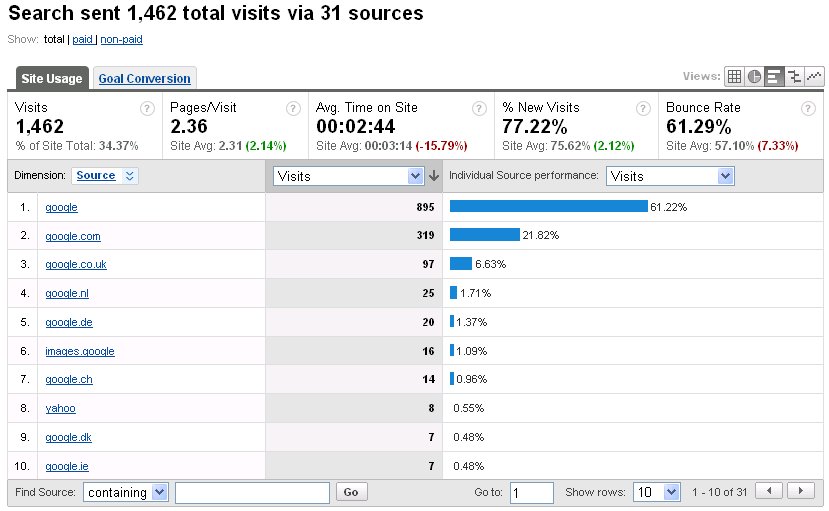
If you use this hack, I would be interested to hear want you think, so please add your comments below or provide a rating by clicking the stars.
New async version of this hack has been launched 🙂
http://www.advanced-web-metrics.com/blog/custom-search-engine-hack
Sorry to be a pillarck, but is it still teh same with the new GA code that has to be placed at the top of the page just before the ?
Jen: This hack has not been tested with the new async code yet. Stay tuned…!
Thanks for all the info. I am trying to find anything that may help me with tracking conversions and page views from keywords from Bing in Google Analytics. Does anyone have the query string to create a unique URL? Is it:
?utm_source=Bing&utm_medium=cpc&utm_term={QueryString}&utm_content={AdID}&utm_campaign={OrderItemID}
Thanks!
I suggest wrapping the list of SE’s inside a function call in the include file. Like this:
function add_organics(
pageTracker._addOrganic(“google.at”,”q”,true);
// etc, etc, etc…
}
Then the list can be called in your site’s / page’s GA snippet like this:
var pageTracker = _gat._getTracker(“UA-XXXXXX-X”);
add_organics(pageTracker);
Just call the function right after declaring the tracker variable(s). For multiple trackers:
var pageTracker_1 = _gat._getTracker(“UA-XXXXXX-X”);
var pageTracker_2 = _gat._getTracker(“UA-XXXXXX-X”);
// etc.
add_organics(pageTracker_1);
add_organics(pageTracker_2);
// etc.
It’s especially convenient for the latter — adding the long, custom SE list to multiple trackers.
Lembit: Nice alternative suggestion and thank you. Do you have a site you have tested?
Hello Brian,
This was a really useful script in the book and thank you for keeping it updated.
I’m currently trying to use the script on a site that has two page trackers and it is not working correctly.
I have changed the script as follows so that instead of page tracker we are using firstTracker and secondTracker:
try{
// Google search domains
firstTracker._addOrganic(“google.com”,”q”,true);
firstTracker._addOrganic(“google.co.uk”,”q”,true);
etc
and then repeated with with a second tracker at the bottom of the script
secondTracker._addOrganic(“google.com”,”q”,true);
secondTracker._addOrganic(“google.co.uk”,”q”,true);
etc
Unfortunately it is not working at all in either account, do you have any further guidance for using multiple page trackers?
Kevin: Thanks for feedback. I would expect the script to work as you describe with the two Tracker objects. Does it work when you just have the one?
For those who are interested in an alternative tracking method, I wrote a post about the use of filters for adding additional search engines in Google Analytics. The post explains how some of the caveats of using _addOrganic() can be eliminated.
ave a difficulty calculating from which search Engine database referrals are coming from the keywords. Is there a way in google analytics to segregate the traffic from a regional search engine say for eg google.co.uk (web results) and google.co.uk(pages from Uk). I need to calculate what keywords are coming from google.co.uk (web results) and from google.co.uk(results From Uk)separately. Is this a possibility in google analytics. It only shows google cpc and google organic and not google.co.uk, google.com or any other google regional database.
Life jackets: I don’t follow your question – doesn’t this post describe the scenario you wish to track?
Thanks for this nice post.Internet marketing has become a great way to increase your site’s traffic so these are great tips which can help you a lot.
I have a good amount of visitors coming from Google Images and, of course, couldn’t track keywords they are using in Google Analytics.
In your custom list, I saw a hack with “prev” and after that GA started saving keywords from Images, but in form /images?q=keyword&hl=en&safe=off&sa=n&um=1 and only several keywords in real form are saved.
Is there any way to track what real keywords are? You referenced to chapter 9 of your book in custom list, but I can’t buy your book just for that 🙂
Milan: Yes, the hack is in Chapter 9 of the book. You’ll just have to buy it 🙂
However, wait for the second edition – coming soon.
I really love the layout and the information you have provided. Articles like this can provide useful insight for marketers. Thank you for the information.
A very, very useful article, great for those just getting into Analytics, well done. Wow awesome resource! I’ve been using GA for a few years now but have barely scratched the surface. Thanks so much!
Fuuny that Brian. I was actually thinking about this today! Great hack.
It’s nice to see a look at GA outside North America.
I trust that this will be in the new book! 😉
Les: It certainly will be – the main motivation for updating this post in fact… 🙂
Will it work after this GA update?
analytics.blogspot.com/2009/10/google-analytics-now-more-powerful.html
Pls. reply
Thank you
Adam: you are correct – I updated the scripts here a couple of weeks ago and these are now back working.
Richard: apologies for the late response – wanted to test before making any announcement. Just checked and all is working.
The latest changes to Analytics add the organic value to the top of the array every time. Meaning, you need to reverse the ordering now for this to work. By adding the default values last, they’re actually getting put back to the top of the array and are then matched first. You’ll also need to add the .com before adding domins like .com.br or whatever so that those match correctly as well.
Looks like the script stopped working at the beginning of the month. Perhaps related to AJAX results rollout?
I’ve been using this “hack” since 2007, when I discovered the predecessor of your list at ga-experts.co.uk and built upon it. I’m from Estonia and have included local SE’s for my country and our neighbors (e.g. Finland, Russia).
I’m glad I found now this new version of yours, Brian — thanks for your work. I’m looking forward to buying and reading your book.
If anyone’s interested, my custom version is located at: http://designux.com/js/ga/engines.js
In addition to Baltic, Russian and Nordic SE’s, I’ve included also a few more global engines.
Final note. Even when using custom list, Google keeps popping up also in the referrers list of GA. Haven’t investigated this in detail, my guess for now is that there are some people using Google Directory (the clone of Dmoz at http://directory.google.com/).
I have just done a search on uk.yahoo.com and was presented with the following URL:
http://uk.search.yahoo.com/search?p=google+analytics&fr=yfp-t-607&ei=UTF-8&rd=r1
It looks like they are definitely using 4th level for search pages.
Brian,
Do you knnow if “uk.search.yahoo” or “images.google” get round the 4 level problem?
pageTracker._addOrganic(“uk.search.yahoo”,”p”);
pageTracker._addOrganic(“images.google”,”q”);
pageTracker._addOrganic(“news.google”,”q”);
pageTracker._addOrganic(“maps.google”,”q”);
pageTracker._addOrganic(“video.google”,”q”);
Thanks
Phil.
P.S I noticed these three were missing:
pageTracker._addOrganic(“search.yahoo.com”,”p”);
pageTracker._addOrganic(“sky.com”,”term”);
pageTracker._addOrganic(“britishinformation.com”, “search”);
Phil: I like your suggestion. However on looking at this again I notice Yahoo has switched back to its original domain schema. Therefore the script will work. I have removed the comment lines.
BTW, I have added sky.com and britishinformation.com to the list of search engines – thanks for the heads up. Note, yahoo is being picked up in the default list at the bottom of the code.
Milen – Fixed. Thanks for the heads up.
Is it me or the code snippets in the post are not full?
All I see is opening and closing “script” tags without any actual code within.
note, I have updated this hack to include Google Local i.e. maps.google.com. However please be aware that GA only recognises up to the third level of a domain i.e. maps.google.co.uk will not work….
Steve/Kevin
Apologies for late response to you queries – they simply slipped by me!
Kevin – you are correct in how to use this hack with multiple GATCs
Steve – yes this is correct. I will be posting soon on this technique i.e. roll-up reporting.
Hi Brian,
Do you know what the search engine named “search” is? Is it search.com?
Thanks,
Gavin
Gavin: In theory yes, it should just be search.com. However, Google Analytics will report the same result if the referring domain is search.mysite.com. search.com is a pretty small engine, so if you are seeing an unusual amount of traffic from ‘search’ this is the most likely explanation.
Essentially, the search engine detection part is a regex on the domain name. For example, you could setup a your own sub domain as yahoo.mysite.com and this would be reported as part of Yahoo search. The regex work ups to the third level i.e. yahoo.this.mysite.com will not work as it is a fourth level domain name.
HTH, Brian
In a similar vein to what steve has posted, the site we are trying to install the custom search engine script on, has four Trackers.
It is currently not working, but I believe this is to do with the code on custom_se-ga.js
At the moment it is “pageTracker._clearOrganic()”
Should this be changed to reflet the fact there are four trackers?
And if so should it be
firstTracker._clearOrganic();
secondTracker._clearOrganic();
thirdTracker._clearOrganic();
forthTracker._clearOrganic();
Thanks
Kevin
Last post made no sense!
Should have read:
Thanks for the update.
We are currently working on migrating to the new GA code and I just couldn’t get this script working – now I know why!
I have an off topic but related question about the ga.js code and it’s implementation:
– if you have multiple GA profiles you want to send the stats to can you ‘break-up’ the js code i.e. does the following work:
var gaJsHost = ((”https:” == document.location.protocol) ? “https://ssl.” : “http://www.”);
document.write(unescape(”%3Cscript src=’” + gaJsHost + “google-analytics.com/ga.js’
type=’text/javascript’%3E%3C/script%3E”));
var firstTracker = _gat._getTracker(”UA-123456-1?);
firstTracker._trackPageview();
var secondTracker = _gat._getTracker(”UA-123456-2?);
secondTracker._trackPageview();
var thirdTracker = _gat._getTracker(”UA-123456-3?);
thirdTracker._trackPageview();
?
Steve
Quick update, this hack will no longer work with Yahoo.
At some point earlier in the year, Yahoo changed its sub domain nomenclature from a third level domain structure such as uk.yahoo.com, se.yahoo.com (which could tracked with this hack) to a fourth level domain structure e.g. uk.search.yahoo.com, se.search.yahoo.com etc, which cannot be tracked…
There is no way round this at present 🙁
Thanks for the update.
We are currently working on migrating to the new GA code and I just couldn’t get this script working – now I know why?
I have an off topic but related question about the ga.js code and it’s implementation:
– if you have multiple GA profiles you want to send the stats to can you ‘break-up’ the js code i.e. does the following work:
var gaJsHost = ((“https:” == document.location.protocol) ? “https://ssl.” : “http://www.”);
document.write(unescape(“%3Cscript src='” + gaJsHost + “google-analytics.com/ga.js’
type=’text/javascript’%3E%3C/script%3E”));
var firstTracker = _gat._getTracker(“UA-123456-1”);
firstTracker._trackPageview();
var secondTracker = _gat._getTracker(“UA-123456-2”);
secondTracker._trackPageview();
var thirdTracker = _gat._getTracker(“UA-123456-3”);
thirdTracker._trackPageview();
?
Steve