What this Plugin does
Aimed at digital marketers running SEO accounts where regional differences are important. For example, Americas, Europe, Middle East, Asia, Australia. This JavaScript plugin, written by Brian Clifton, separates out 264 regional search engines – for example, google.co.uk, google.com, google.co.nz etc. – instead of just “google” as reported in GA by default. Read the blog post.
- Tracks visitors from 189 regional Google domains – and their keywords
- Tracks visitors from 30 regional Yahoo domains – and their keywords
- Tracks visitors from Google Maps, News, and Video search – and their keywords
- Tracks visitors from 46 other search engines tracked that are not available in GA:
- e.g. BBC, Tesco, Kelkoo, Maktoob (Arabic), Naver (Korea), HotBot, zinza (Arabic), Rambler (Russian), others…
- Adds price comparison engines kelkoo.com, pricegrabber.com
- NOTE: These are all in addition to the GA defaults, that has 40 search domains
- See the full list of detected search engines
Also try this with the Auto-Tracking File Downloads & Outbound Links plugin.
Usage
- For use with ga.js (async) only.
- The list of tracked search engines and domains and associated code is regularly updated. All subscribers will be notified of updates via email.
- Last code update: April-2011
- Purchase the plugin to receive the JavaScript file (from £48)
- Upload the .js file into your website root directory (used in this example) or other suitable place
- Modify all your web pages (once only change) to reference the .js file above your Google Analytics Tracking Code. Then add the complete line shown below that contains the “//set custom search engines” comment. This must be placed on the line above your
_trackPageviewcall - That’s it… Or perhaps you thought there was more!
Example GATC – just two lines to add (#1 and #6):
[javascript]
<script src="/custom_se-async.js" type="text/javascript"></script>
<script type="text/javascript">
var _gaq = _gaq || [];
_gaq.push([‘_setAccount’, ‘UA-12345-N’]);
addCustomOrganic(_gaq); // set custom search engines
_gaq.push([‘_trackPageview’]);
(function() {
var ga = document.createElement(‘script’); ga.type = ‘text/javascript’; ga.async = true;
ga.src = (‘https:’ == document.location.protocol ? ‘https://ssl’ : ‘http://www’) + ‘.google-analytics.com/ga.js’;
var s = document.getElementsByTagName(‘script’)[0]; s.parentNode.insertBefore(ga, s);
})();
</script>
[/javascript]
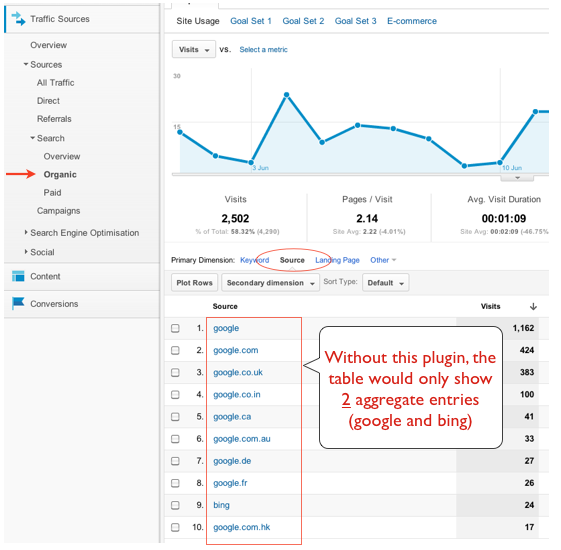
Allow at least 4 hours for your new search engines to be reported in your GA account. To view these, log into your Google Analytics account, select the Search Engines report and view the enhanced detail – as per below:
Updates
By subscribing to this hack you will be notified when the list of detected search engines is updated. Then all you need to do is replace your .js file with the new one. No page or GATC changes required.
Feedback
As always, I appreciate feedback. Also, feel free to suggest new search engines to be added to the list. Also, check out the Auto-Tracking File Downloads & Outbound Links plugin.