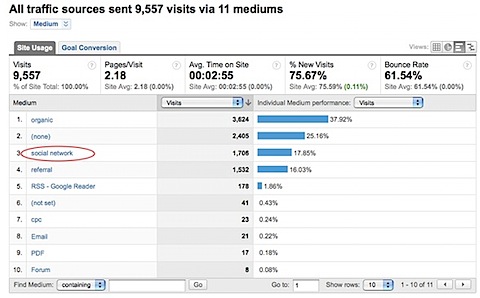
 This is not really a hack – rather the application of a simple (yet powerful) filter that allows you to compare visits from social networks side by side next to other referral mediums. The result allows you to have a quick comparison of the significance of social networks to your site in your Google Analytics reports, rather than having to drill down into each referrer. For example:
Background on social networks and user generated content
(taken from a recent Bowen & Craggs presentation)
Social networks have exploded on the Internet. The vast numbers of people now participating in them has resulted in a huge influence over brand perception. Hence their importance when considering your digital strategy. Some companies such as Dell*, Harley Davison and Starbucks, to name a few, use social networks as a direct feedback mechanism to actively drive their on and offline marketing strategies.
Key facts:
- There are an estimated 250 million internet users on a social network, from zero 5 years ago.
- MySpace alone claims over 200 million registered users, more than the population of Brazil or Russia. For Myspace in the US, think Facebook and Bebo in the UK, Orkut in Brazil and India, CyWorld in Korea, Mixi in Japan, Lunarstorm in Sweden and so on.
- Around 120,000 blogs are created each day – that’s blogs, not posts!
- In a mid-2007 IBM survey of online adults (aged 18+), the percentage of people claiming to have contributed to a user-generated content site was 9% in Germany, Australia and the UK; 7% in the US and 4% in Japan.
- Of those who contributed content, 58% did so for recognition and community, not monetary gain.
- 6 hours of video are uploaded to YouTube every minute – it would take you a whole year to view one day on uploaded content.
*The Dell Hell story that started with Jeff Jarvis in 2005 is now part of Internet history. It first starts as a story of how bad customer service was with a computer manufacturer, but then becomes a success story as Dell first listened to what was being said about them on the web, and then acted with huge investment. Not only did they invest to correct the problem (poor customer service) but they also invested in bringing the voice of their customers closer to the company by setting up their own social networks around Dell products.
So social networks are important – how do we track them?
In Google Analytics, all visits that originate from a social network are tracked – just like any other referral to your site. That is, if someone writes about you on a site such as Facebook or LinkedIn and creates a link to your web site that others click on, you will see this traffic and its associated source in your Traffic Sources > Referral reports.
Its tracked by default – so why the fuss?
The dichotomy here is that visits from the plethora of social network sites are grouped together with the plethora of visits from all the other referral links to your site. You literally cannot see the wood for the trees as this screenshot shows.
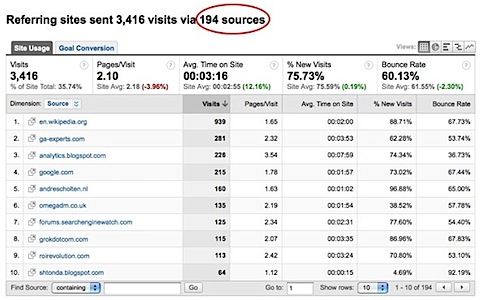
Even for this relatively small site, there are more than 194 referrers with
visits from social networks mixed in.
Applying the social networks filter (updated Dec-2011)
I use the following regular expression to match social networks that are relevant to me:
wikipedia|stumbleupon|groups\.google|groups\.yahoo|linkedin|facebook|
webmasterworld|twitter|^t\.co|technorati|newsgator|PRweb|econsultancy|
searchengineland|hootsuite
Note the use of the “|” character for the logic OR operation i.e. match textA OR textB OR textC etc. You will want to build your own regular expression list around the networks that are important to you. Note that ^t\.co is a match for the URL shortener of Twitter. Since Aug-2011, Twitter automatically shortens URLs that are longer than 20 characters.
Note, Google Analytics has a limit of 255 characters in its filter pattern matching field.
Applying the above in the Google Analytics Filter Manager is shown below:

This filter simply re-labels the medium associated with visits from my list of social networks from “refrerral” to “social network” – you can use any naming convention you wish.
The result is a report that aggregates all visits from your social network in a similar way to how organic visitors or Google AdWords visitors are automatically aggregated by default. It provides an at-a-glance view to ascertain the importance/activity of social networks to you. In this case, visits from social networks are clearly important – the third most important medium accounting for 17.65% of visits to this site. Without the filter, that would be difficult to ascertain, requiring the manual identification and counting of each social network referral. As always, you gain further detail by clicking the report link.
Update: If you are a blogger, another hack to help you analyse your social network visitors is the Social Media Metrics Grease Monkey plugin from the guys at VKI Studios in Canada. It allows you to include the Digg count of a page right within your Google Analytics reports with new social networks continuously being added (StumbleUpon, Del.icio.us etc.)
Are you doing anything clever with Google Analytics filters? Please share your experiences with a comment.


I’m in the process of reading your book and LOVE it by the way 🙂
Question: Our Social Media team shortens our URLs (for Twitter) using a trackable URL shortening tool (BudUrl). When we look at the “twitter” traffic in GA we don’t see nearly as many visits as we see in BudUrl from the trackable links. They say and I’ve read that you will only see traffic coming from the twitter’s web interface which most people don’t use. Most people use desktop OR mobile clients that are not browsers. My question is, how do we fix this? And is this also happening with Facebook (I really only use my iPhone app for Facebook).
@Erica – make sure you read Ch7, “Campaign Tracking” on this. Essentially you need to add these *before* shortening your landing page URLs (page 231). Then apply the filter described here.
Thanks for this useful tip ! However i’d like to tune it so i can add more social networks. What string do I need to add? Only the domain name of the Social network website?
Thanks
N.
Talk about de-mystifying a really cool part of Google Analytics 🙂 Thanks so much for this, Brian!
Take a look at this tool – http://www.socialreport.com – very similar to Google Website analytics but for social network.
Half my life is analysis paralysis and this social tracking tip is just another daily task now, great!
Good idea of using analytic filter for tracking social network traffic!!!
@Brian
I hope you dont mind if I suggest the following filter improvements…
Advanced filter: (255 character limit)
Source:blog|forum|board|community|group|answers\.yahoo\.|twitter|facebook|linkedin|flickr|digg|livejournal|myspace|tumblr|del\.?icio.?us|faves|reddit|squidoo|stumbleupon|technorati|netvibes|newsgator|wikipedia|wordpress|typepad|PRweb|ow\.ly|gumtree|feedburner
Medium:^referral$
Output medium:social
($B1 Required ticked)
* “ning” was removed as it matches lots of domains ending with xxxning e.g. beginNing.com
* If their was more space I would add hootsuit & craiglist. Also webmasterworld|econsultancy are industry specific forums so removed, as generic filter.
* “social network” standardised to “social”
* feedburner added, but this is only necessary of auto-utm tags are missing.
Thanks
Phil.
Ok, I deleted the filter, but tomorrow i will be able to send to you the screenshots with anomalies.
Thank you!!!
Daniel: Please contact me direct with further explanation of this i.e. screenshots with anomalies highlighted.
Good article!
But I have tested it on my Google Analytics and it doesn’t seem to work 🙁
The number of visits from social media increases every day, but when I see the Facebook.com entries, always is higher than the number than the filter shows.
Do you have any idea what’s the problem? Thank you very much.
Brian,
If the 255 character limit becomes an issue, is the right thing to do create another profile and setup another filter to attach to that profile?
Thanks!
Wil
Wilson: yes that will work i.e. a cascading filter.
Brillant !
Social media sources are becoming more and more relevant to underline fact that new tools of bookmarking (sharethis, gigya,…) must be integrated.
These kind of filter give easy focus on critical mass to get on social media to make the buzz.
Thanks, and nice to read your posts
Fantastic. I’m going to implement this on a few sites now 🙂
Great tip – I also use the Grease Monkey plug-in in Firefox for compiling special screen-shots for clients who won’t switch browsers or install plug-ins themselves. This gives me a quick snapshot ability to send social site data to clients at a moment’s notice.
Good work,good analysis. Now a days, social media networks are becoming more and more important in the field of internet marketing. One day, Web Marketers give equal importance to social media networks and search engines.
Not bad Brian. I guess is a great way to have an eye of the evolution of these kind of sites more than to trust the accuracy of the concept it self.
I will definitely try it. Thanks!
Excellent tip Brian. This is the first time I enter your blog but certainly it won’t be the last.
Thanks
Great tip! I tried it out right away using your regular expression to set up an Advanced Segment.
@Brian: The fact, that the segments only apply to the user account and not to a profile is really a missing feature in my view.
Very very useful and, as far as I can tell, not available in other analytics solutions, at least not in the side by side way. Rocks. Thanks.
Added bonus of using segments is that you can compare them in one screen.
Joost: yes you can do something similar now with the Advanced Segments feature that is in beta.
The main difference is that Advanced Segments are on a per GA user basis, where as the filter is set on a per profile basis.
Hi Brian, why did you do this with a filter and not with an advanced segment?
Social networks are our primary focus, this is a GREAT idea and we will implement asap.
all the best,
sandy
Megastarmedia.com
Hi Brian,
Thanks. That’s a really useful one to know. Will try out asap.
Nikki